


With the EasyParcel API integration, you can create shipment directly into EasyParcel portal when you create packages at your order fulfilment.
- Create shipment package for individual order
- Create shipment packages in batch
- Cancel package
- Install the EasyParcel Module
- Retrieve API Keys from EasyParcel
- Setup EasyParcel API Integration
- Setup Shipment Notification
Create package for individual order
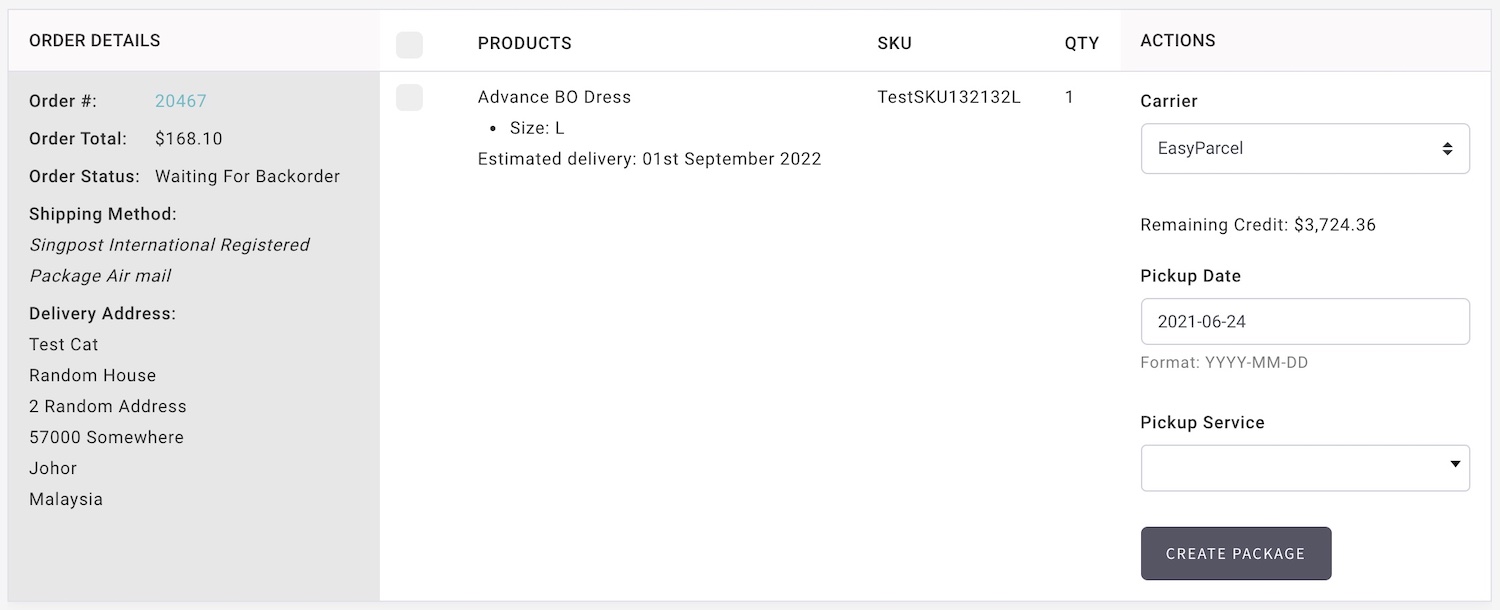
- Go to Manage Your Store (Dashboard) > Orders > Fulfil Orders
- Apply filter to located the required order.
- Select the items.
- Select EasyParcel from Carrier list.
- Enter Pickup Date, and Pickup Service.
- Click Create Package and your shipment will be created automatically in EasyParcel portal.
- The package status will be updated and notify to your customer as the parcel is process by EasyParcel:
- Package Arrived At EasyParcel Facilities
- Package delivered to customer
Create packages in batch
- EasyParcel option is not available for batch create packages.
Cancel EasyParcel packages
-
If you need to cancel a package, you need to do a manual cancel and both portals.You need to cancel the package from EasyParcel AND cancel at Shopcada separately.
Install EasyParcel Module
- Please go to Shopcada App Store to install the module.
Go to Manage Your Store (Dashboard) > App Store
Retrieve API Keys from EasyParcel
- Refer to EasyParcel Guide.
Setup EasyParcel API Integration
- Go to Manage Your Store (Dashboard) > Settings > Orders > Carriers Settings.
https://www.YourDomain.com/admin/settings/orders/fulfilment - Go to EasyParcel, click Configure
- Enter API Key.
- Select EasyParcel API Server environment
- Fill in the pick up details and order details.
- Click SAVE.
Setup EasyParcel Shipment Notification
- You can set up a different notification to keep your customer informed about the parcel status.
- Go to Manage Your Store (Dashboard) > Settings > Emails > Email List
- Under Order Fulfilment, enable the email notification:
- Shipment Notification - EasyParcel: This is the notification send to customer when carrier service scan pickup from your warehouse. You may include Tracking Information into this email.
